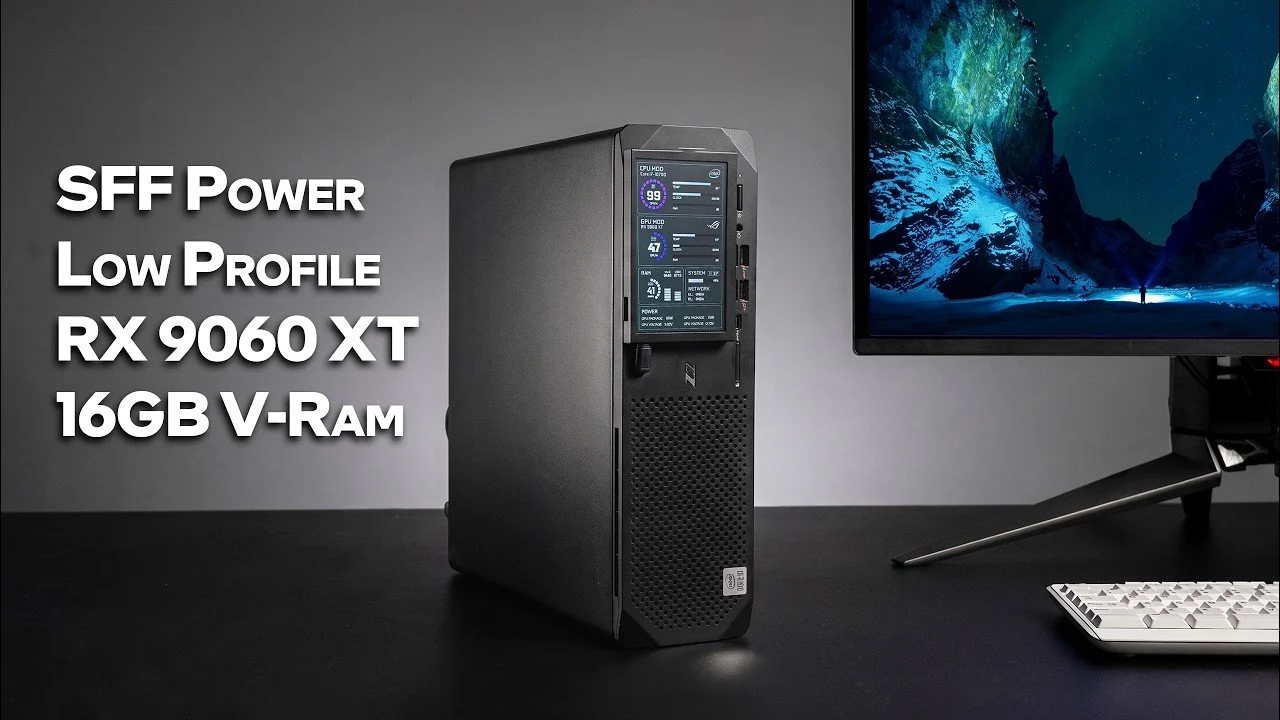
Companies often dispose of older hardware in bulk, but these systems can still serve as the foundation for practical projects. ETA Prime demonstrates how a used HP Z2 G5 workstation, commonly sold for around $150, can be converted into a 1440p gaming PC. By adding a low-profile Radeon RX 960 XT GPU, upgrading the power supply to a 400W unit and improving airflow with an additional fan, the build achieves a balance between cost and performance. The workstation’s Intel Core i7-10700 processor and 16GB of DDR4 RAM provide a reliable base for gaming and multitasking, making it a viable option for budget-conscious users.
Discover how this setup handles modern games like Red Dead Redemption 2 and Forza Horizon 6, delivering smooth gameplay at high settings. Gain insight into the system’s constraints, such as the limitations of its PCIe 3.0 slot and older CPU architecture. Additionally, explore potential upgrades, including GPU replacements or power supply enhancements, to further improve performance. This guide offers practical steps for repurposing hardware into a capable gaming machine.
The Foundation: HP Z2 G5 Workstation
TL;DR Key Takeaways :
- Repurposing an HP Z2 G5 workstation with an Intel Core i7-10700 CPU and 16GB DDR4 RAM can create a cost-effective 1440p gaming PC, with units priced between $150 and $250.
- Key upgrades include a Radeon RX 960 XT GPU, a 400W power supply, enhanced cooling and a performance monitor for real-time system metrics.
- Performance benchmarks show the system is slightly limited by its older CPU and PCIe 3.0 slot but still delivers solid results for gaming and multitasking.
- Gaming tests at 1440p demonstrate smooth performance on modern titles, achieving high settings and FPS in games like “Red Dead Redemption 2” and “Mortal Kombat 1.”
- Future upgrades, such as a newer GPU or higher-wattage power supply, could further enhance performance, though they may increase the overall cost of the build.
The HP Z2 G5 workstation serves as the backbone of this project. Originally designed for professional workloads, this machine is powered by an Intel Core i7-10700 processor, featuring 8 cores and 16 threads. While not the latest in CPU technology, it provides sufficient power for gaming, multitasking and general productivity. Additionally, the system comes equipped with 16GB of DDR4 RAM, which can be expanded to meet more demanding requirements.
These workstations are often sold as B-grade units, typically priced between $150 and $250 depending on their condition and configuration. Their affordability, combined with their robust build quality, makes them an ideal starting point for a budget gaming PC.
Essential Upgrades and Modifications
To transform the HP Z2 G5 into a gaming-ready machine, several key upgrades were implemented. These modifications were chosen to maximize performance while maintaining cost efficiency:
- Graphics Card: A Radeon RX 960 XT GPU, built on RDNA4 architecture, was installed. This low-profile card features 16GB of VRAM and a 140W TGP, making it well-suited for 1440p gaming. Its compact design ensures compatibility with the workstation’s small form factor.
- Power Supply: The original power supply was replaced with a 400W unit equipped with an 8-pin PCIe connector to support the GPU’s power requirements.
- Cooling Enhancements: An additional cooling fan was added to improve airflow and maintain stable temperatures during extended gaming sessions. This ensures the system remains reliable under heavy loads.
- Performance Monitor: A customizable external screen was integrated to track real-time system metrics, such as temperatures, frame rates and utilization. This addition enhances the user experience by providing valuable insights into system performance.
These upgrades significantly enhanced the system’s gaming capabilities while making sure stability and efficiency during operation.
Here are more detailed guides and articles that you may find helpful on gaming PC.
Performance Benchmarks
To evaluate the upgraded system’s performance, a series of benchmarking tools were used. The results provide a clear picture of the system’s capabilities and limitations:
- Geekbench 7: The Intel Core i7-10700 scored approximately 33% lower in single-core and 43% lower in multi-core performance compared to a Ryzen 7700X. While this highlights the CPU’s age, it remains sufficient for most gaming scenarios.
- 3DMark Time Spy: The system achieved a total score 7% lower than a comparable build with a more modern CPU. This minor gap is primarily due to the PCIe 3.0 slot and the older processor, which slightly limit the GPU’s potential.
Despite these limitations, the system delivers solid performance, particularly for its price point, making it a viable option for budget-conscious gamers.
Gaming Performance at 1440p
The upgraded system was tested across several modern games to assess its real-world gaming performance. The results demonstrate its ability to handle 1440p gaming with ease:
- Blacksmith Wukong: High settings, averaging mid-70 FPS.
- Forza Horizon 6: Ultra settings, with occasional dips below 60 FPS.
- Mortal Kombat 1: Very high settings, maintaining a smooth 60 FPS.
- Red Dead Redemption 2: High settings, averaging in the high 90 FPS range.
- Crimson Desert: High settings with FSR frame generation, averaging above 64 FPS.
These results highlight the system’s ability to handle modern games at high settings, delivering a smooth and enjoyable gaming experience.
Considerations and Potential Upgrades
While this build offers excellent value, it does come with certain limitations that may affect performance in specific scenarios:
- CPU Bottleneck: The Intel Core i7-10700 may limit performance in CPU-intensive games or when running at higher resolutions.
- PCIe 3.0 Slot: The older PCIe 3.0 interface restricts GPU bandwidth, though the Radeon RX 960 XT’s 16GB VRAM helps mitigate this issue to some extent.
Future upgrades could address these constraints. For instance, replacing the GPU with a newer model, such as an RTX 4060 or RX 5060, would provide a significant performance boost. However, such upgrades may require a higher-wattage power supply, which would increase the overall cost of the build.
Repurposing for Value and Performance
Transforming a discarded HP Z2 G5 workstation into a 1440p gaming PC demonstrates the potential of budget-friendly builds. With thoughtful upgrades, you can achieve impressive gaming performance without overspending. While the system has its limitations, it remains a compelling option for gamers seeking value and functionality. If you can source a used workstation at a reasonable price, this build offers an excellent entry point into PC gaming, combining affordability with solid performance.
Media Credit: ETA PRIME
Disclosure: Some of our articles include affiliate links. If you buy something through one of these links, techschimp Gadgets may earn an affiliate commission. Learn about our Disclosure Policy.