

AGM M10 Rugged Basic Flip Phone, 4G Feature Cell Phone, Simple Mobile Phones, Pocket-Sized, Waterproof & Drop-Proof, Speed Dial, Large Fonts & Big Buttons, 98dB Speaker, Dual SIM, for T-Mobile ONLY
Original price was: $89.99.$76.49Current price is: $76.49.


Product description
Please Note: AGM M10 ONLY supports T-Mobile. Other carriers are NOT compatible.
The video showcases the product in use.The video guides you through product setup.The video compares multiple products.The video shows the product being unpacked. M10 Rugged Basic Flip Phone, 4G Feature Cell Phone Merchant Video
1.Please Note: AGM M10 FLIP only supports T-Mobile and is not compatible with other carriers.
2.If you’ve purchased a new SIM card, please make sure to activate it in another phone before inserting it into the M10!!
3.Handle the SIM card slot gently to avoid damage that may prevent card detection.





Here’s the AGM M10 FLIP Guide Video to help you better understand how to use it! Step-by-Step Video Guide for AGM M10 FLIP How to Properly Install Your SIM Card in the AGM M10 FLIP ?
1.If you’ve purchased a new SIM card, be sure to activate it in another phone before inserting it into the M10. Failing to do so may result in the SIM card not being recognized by the device.
2.When inserting the SIM card into the AGM M10 FLIP, gently open the SIM slot and carefully place the SIM inside. Avoid applying excessive force to prevent damage to the slot, which may cause issues with SIM detection.
The video showcases the product in use.The video guides you through product setup.The video compares multiple products.The video shows the product being unpacked. SIM Card Setup Guide for the AGM M10 FLIP Merchant Video
The video showcases the product in use.The video guides you through product setup.The video compares multiple products.The video shows the product being unpacked. Step-by-Step Guide: How to Open the Back Cover ? Merchant Video
Step-by-Step Video Guide for AGM M10 FLIP How to Properly Open the Back Cover of the AGM M10 FLIP ?
1.The AGM M10 FLIP is built with durability and waterproofing in mind, so the back cover is securely fitted. As a result, you might find it a bit challenging to open the back cover at first.
2.Don’t worry! You can follow the step-by-step video tutorial to easily open the back cover of your AGM M10. And if excessive force causes any damage, we’ve got you covered—we’ll send you a brand new AGM M10 FLIP…….
Step-by-Step Video Guide for AGM M10 FLIP How to Properly Use the AGM M10 FLIP Charging Dock?
1. Connect to Power: Use the included USB Type-C charging cable and power adapter to connect the charging dock to a power outlet.
2. Place the Phone Correctly: Tilt the M10 FLIP slightly as you place it into the charging dock, making sure the metal contacts at the bottom of the phone are aligned with and firmly touching the charging contacts on the dock.
3. Check Charging Status: Once placed correctly, a charging icon will appear on the screen, indicating that the phone is charging.
The video showcases the product in use.The video guides you through product setup.The video compares multiple products.The video shows the product being unpacked. How to Properly Use AGM M10 FLIP Charging Dock?? Merchant Video
The video showcases the product in use.The video guides you through product setup.The video compares multiple products.The video shows the product being unpacked. Peel off the film on the battery’s metal contacts. Merchant Video
Step-by-Step Video Guide for AGM M10 FLIP Please peel off the protective film on the battery contacts before using the M10
1.Before using your M10 for the first time, please remove the protective film covering the metal contacts on the battery. This film protects the battery during shipping and storage by preventing short circuits.
2.If the film is not removed, the battery contacts won’t connect properly with the phone’s internal contacts. This can cause the phone to fail to power on or charge correctly.
3.Removing the protective film ensures a secure electrical connection, allowing your phone to function normally.
Step-by-Step Video Guide for AGM M10 FLIP How to Attach a Lanyard to Your M10 FLIP?
1. Locate the lanyard hole on the top corner of your M10 FLIP.
2. Thread the thin loop of the lanyard through the hole.
3. Once the loop is through, pass the thicker end of the lanyard through the loop.
4. Pull it tight to secure the lanyard in place.
The video showcases the product in use.The video guides you through product setup.The video compares multiple products.The video shows the product being unpacked. How to Attach a Lanyard to Your M10 FLIP? Merchant Video


***1-for T-Mobile ONLY***: AGM M10 FLIP (Comes with a Charging Dock and 2PCS 1200mAh batteries) is compatible exclusively with “T-Mobile” carriers. Please confirm network compatibility before purchasing. If you have any questions about your carrier, our support team is always here to help.
***2-Important Activation Note***: If you’ve purchased a new SIM card, be sure to activate it in another phone before inserting it into the M10 FLIP. Failing to do so may result in the SIM card not being recognized by the device.
***3-Proper SIM Card Installation***: When inserting the SIM card into AGM M10 FLIP, gently open the SIM slot and carefully place the SIM inside. Avoid applying excessive force to prevent damage to the slot, which may cause issues with SIM detection.
Meet AGM M10 FLIP – your perfect everyday companion designed for effortless portability. At just 110mm long, 56.4mm wide, and 25mm thick, this sleek device slips seamlessly into jeans pockets, jacket sleeves, or backpack compartments without adding bulk. Weighing a featherlight 139 grams, it maintains a satisfying heft that feels substantial yet never cumbersome.
The smart 25mm profile strikes the ideal balance – substantial enough to handle comfortably, slim enough to slide into tight spaces. Dress shirt breast pockets? Check. Minimalist crossbody bags? Absolutely. Gym shorts side pockets? No problem. Redefine convenience with a device that works where you work: urban adventures, coffee shop sessions, or weekend getaways.
Built to Last – Rugged & Reliable: If you’re looking for a flip phone that can keep up with your lifestyle, AGM M10 is the perfect choice. It’s certified with IP68 and IP69K ratings for water, dust, and temperature resistance ( 5°F – 131°F ). Plus, it meets MIL-STD-810G standards for shock resistance, making it durable enough to withstand drops, bumps, and everyday wear and tear.
Speed Dial – Stay Connected in Seconds: Stay connected with loved ones by assigning speed dial numbers to frequently called contacts. Just press and hold a preset button to dial instantly—ideal for those who have trouble remembering phone numbers or need quick access during emergencies.
Stay Safe with a Single Press: When every second counts, AGM M10’s SOS button has your back. Located just below the camera, this easily accessible, programmable key lets you instantly call emergency services, family, or any contact you choose—simply press and hold for 3-5 seconds. Peace of mind is always within reach.
Large Fonts & Big Buttons – Easy and Accessible: Designed with accessibility in mind, AGM M10 FLIP features large fonts and big buttons that make dialing and texting effortless. The large display and buttons provide a frustration-free experience for users of all ages. (SMS and MMS support T9 input.)
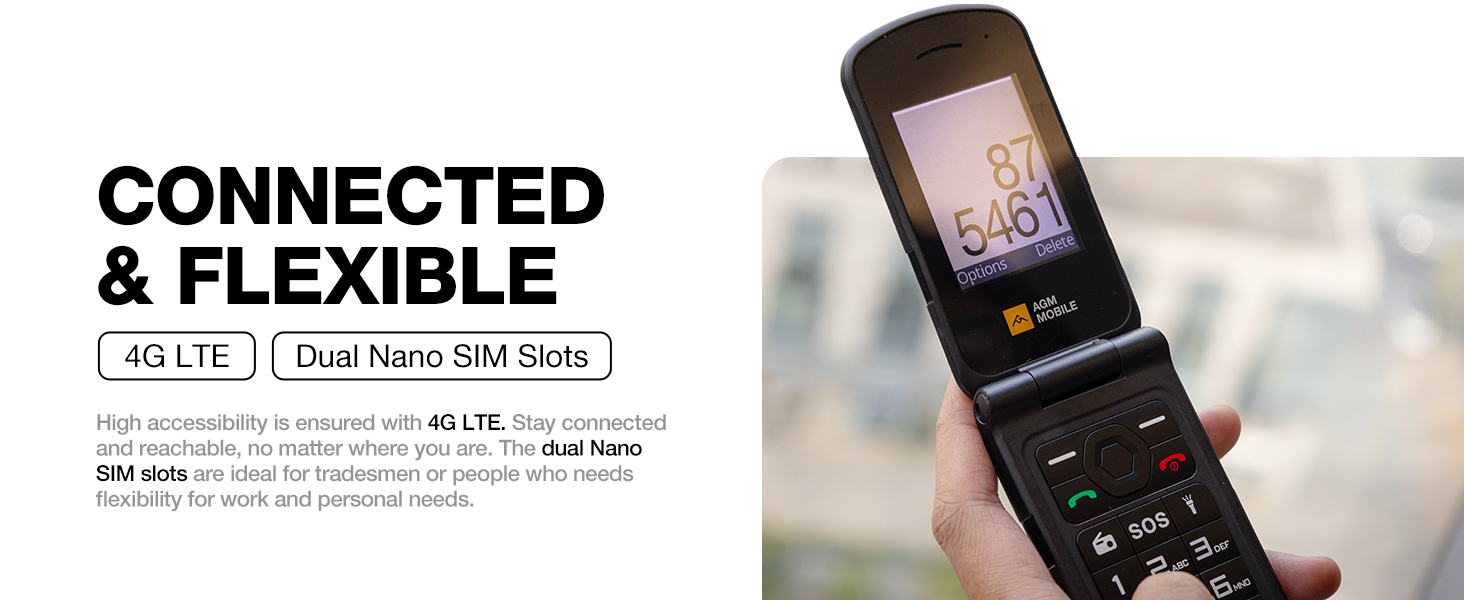
Dual SIM, Dual Standby – More Flexibility: Need two numbers on one device? AGM M10 FLIP supports dual SIM cards, making it ideal for separating work and personal calls or using local networks while traveling. Note: When two SIM cards are inserted, only one can use 4G at a time.
User Reviews
Be the first to review “AGM M10 Rugged Basic Flip Phone, 4G Feature Cell Phone, Simple Mobile Phones, Pocket-Sized, Waterproof & Drop-Proof, Speed Dial, Large Fonts & Big Buttons, 98dB Speaker, Dual SIM, for T-Mobile ONLY”
Related Products


Original price was: $89.99.$76.49Current price is: $76.49.


There are no reviews yet.